


How to Set Up a Business Account with Penguin Random House

Step 1: Access the online account portal to begin setting up your Penguin Random House Business Account If you’re a librarian and have not ordered from Penguin Random House before, you can create a business account by filling out an application through our online account application portal. If you have any questions about the application, please reach out to our New Accounts team at newaccount@prh.com.  Step 2: Register for our

Read more
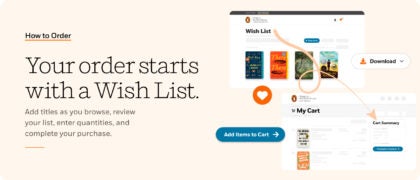
Your Order Starts with a Wish List

Convert your Wish List to an Order It’s never been easier to discover new books or meet patron demand—all day, every day!  You can now send your Penguin Random House Library Marketing Wish List to your Penguin Random House Self-Service shopping cart.  Simply sign-in using your PRH Self-Service account details . . .   Then browse Library Marketing and add titles to your

Read more

Register with Penguin Random House Self-Service to Order 24/7

Penguin Random House Self-Service is our business-to-business portal that offers librarians a fast and easy way to order books, track shipments, review orders, manage invoices, and place claims. When you register with PRH Self-Service, you also get the ability to sign in on this site, Penguin Random House Library Marketing—using the same email address and password—and can send your Wish List directly

Read more

How to Order from Penguin Random House Library Marketing

The first step in the ordering process is to create a Wish List of titles you’re interested in purchasing on the Penguin Random House Library Marketing website.  After your list is created, you can either add the titles directly to your Penguin Random House Self-Service shopping cart. If you’re a library and have never ordered from Penguin Random House before, learn

Read more